

Welcome to Orion’s first Happenings of 2013! For those of you who are unfamiliar with Happenings, think of it as a Newsletter for Orion Clients only. We want to provide our users with useful information, informative webinars, tips and tricks to help you become as productive as possible. Your feedback is valued, and we want to hear what our Orion users have to say, please reach out to us at info@orionlaw.com.
New Year, New Improvements
The New Year is an exciting time for Orion as we look forward to the announcement of many new software features and improvements. Stay tuned over the coming months for more details!
Orion is stronger than ever before and we continue to provide our clients with the most usable and innovative software available. As our client base continues to grow, so has the number of Orion employees. Expanding the Orion team ensures that customer service always remains our top priority. We look forward to working with you in the coming year.
We hope to see you all at LegalTech® New York, the largest legal technology conference of the year taking place January 29 – 31, 2013! Orion will be making an exciting announcement involving iOrion, the most complete law management application available for iOS, you don’t want to miss out!
January is 1099 Time
by: Mike Marget – Sr. Managing Director
4L Law Firm Services LLC
It’s mid-January. When I was a law firm administrator, mid-January meant two things: (a) I was about to start breaking all those New Years’ Resolutions; and (b) Form 1099 reporting concerns were about to shift my focus away from other really important year-end stuff like closing the books, preparing tax estimates and working on partner compensation.
The following — from the files at 4L Law Firm Services LLC – is a (serious) list of Top 10 Questions asked about 1099 reporting over the last 12½ months:
1. Do disbursements from the firm’s trust accounts need to be considered in the annual 1099 reporting process?
Absolutely! For instance, if you have a non-IOLTA trust account, any interest earned ($10 or more) which was credited to the client’s trust balance must be reported on Form 1099-INT.
2. Isn’t there a 1099 exception for IOLTA trust accounts assigned the State Bar’s tax id number by the bank?
There is no blanket IOLTA exception. The bank account’s tax id number is irrelevant. If the account is controlled by the law firm and used in its trade or business, disbursements may be subject to the 1099 reporting rules. While interest generated for the Bar-sponsored program is exempt, other disbursements from IOLTA bank accounts may require 1099 reporting. Examples include remittances to co-counsel and experts hired by or managed by the law firm pursuant to the “Middleman Rule.”
3. Our landlord is ABC Company LLC, but the monthly lease/rent payments go to DEF, Inc.; who gets the 1099?
If DEF is a real estate agent, the payments do not need to be reported (although such real estate agents are required report the monies received on behalf of their principal).
4. Our landlord is an affiliated but separate partnership. Rather than paying rent, the firm pays the mortgage, building insurance and real estate taxes on behalf of the affiliate. Is a 1099 filing required?
A 1099-MISC should be sent to the landlord. The amount reported should include the aggregate mortgage, insurance and real estate tax payments.
5. A client remitted $180,000 to our trust account. Over time, half was remitted to the firm and half to co-counsel in another city. Any 1099 reporting required?
Under the “Middleman Rule,” if your firm helped select and supervise co-counsel, a 1099 from your firm to the co-counsel is appropriate.
6. The firm pays a former partner a monthly unfunded pension. A 1099-MISC was issued, but the former partner is insisting it be replaced by a 1099-R. What’s going on?
The former partner prefers a 1099-R to avoid paying self-employment taxes. However, 1099-R is reserved for payments relating to a qualified retirement plan. The so-called unfunded “pension” is actually deferred compensation, not QRP payments. Form 1099-MISC is correct.
7. The firm received a check made jointly payable to us and to our client. It was deposited into a trust account and disbursements made to the firm and to the client. Any 1099 reporting required from my firm?
No. If 1099 reporting is required, the responsible party is the one who issued to original check. The law firm’s remittance of the client’s portion is purely an administrative act.
8. Our IT consultants bill by the hour and are paid for software and hardware purchased on our behalf. Should the 1099 amount include the software and hardware sums?
Technically, if you have original receipts substantiating the purchases, you do not need to include the software and hardware amounts. Without receipts, the out-of-pocket expenses must be included on the 1099. Practically speaking, it is difficult to scan each vendor record to analyze which payments have receipts attached. In the real world, report the aggregate amount paid to the consultants. The consultants will be able to deal with any tax deductible amounts on their own tax return.
9. We reimbursed a potential lateral hire for travel expenses. Do I need to obtain a W-9 and/or send a 1099?
An employment interview does not equate to rendering “services” and presumably the travel expenses were substantiated by receipts. No 1099 reporting required.
10. Our firm pays a scholarship on behalf of a local student with no other ties to the firm. 1099 reporting required?
So long as the student provides no services in return for the scholarship stipend, no 1099 reporting is required.
Bonus Question: Is there a concise, not-too-technical resource to help unravel more of the mysteries of 1099 reporting?
There are several guides available at www.irs.gov. But if “not-too-technical” is what you seek, check out the Law Firm CFO blog, entry entitled “1099 Decision Flowchart”.
Mike Marget is senior managing director of 4L Law Firm Services LLC, an affiliate of Orion Law Management Systems, Inc. 4L performs outsourced bookkeeping and billing services and provides a managed IT solution for small and midsize law firms. These services utilize Orion’s financial management and practice management software which 4L offers on a SaaS basis via the Cloud. 4L’s clients also include law firms who have installed Orion software and later decided to delegated some billing and other back office accounting tasks to 4L. Mike is a former large law firm administrator – COO and CFO – and can be reached at mmarget@4L-Law.com. He also edits a blog at www.LawFirmCFO.com.
Orion University – Upcoming Webinars
January 16 at 2pm EST
“Are You Ready for the January 31 1099 Deadline?” Hosted by
Mike Marget Senior Managing Director and CEO, and Heather Tang, Managing Director and Chief Law Firm Accounting Officer of 4L
The learning objectives of this 45-minute webinar include:
Collecting Tax Identification Numbers (TINs) from payees
Extracting data from the Orion accounting software for 1099 reporting purposes
Recognizing which 2012 disbursements must be reported.
Reporting to vendors
Reporting to the IRS
This webinar will be held on Wednesday, January 16th 2013 at 2pm (EST). Click here to register.
Kevin Harris of Orion and Walt Romney Jr. of Clyde Snow Publish “IT and the Business of Billable Time” in ILTA’s Peer to Peer Magazine
In both proactive and reactive ways, IT professionals play a central role in billing at a law firm, and their contributions are instrumental to the success of the firm. They are in a position to streamline and increase billings by providing excellent support and software. Their ability to solve technology problems as they arise ensures lawyers and paralegals have a clear path to meeting their hourly targets each day. The more IT cooperates and collaborates with lawyers and staff to create a functional workflow, the more profitable the firm will be and the better morale will be.
http://orionlaw.com/lib/fn/Business_of_Billable_Time.pdf
Orion Hires 2 New Team Members
Orion continues to grow! We just added two new experienced professionals to our team. Please joining us in welcoming in Heather Rutt and Alan Sargent – short bios for each below.
Heather N. Rutt, Marketing Coordinator
Prior to joining Orion, Heather has held Marketing positions where she gained valuable experience in public relations, branding, advertising, graphic design, and much more. She also has a worked previously in retail management, from which she brings a positive “client focused” attitude. Feel free to welcome her via Orion’s Twitter and LinkedIn!
Alan “Al” J. Sargent, Consultant – Sales
Al brings extensive experience to Orion from a long career working with a number of well known software providers in the industry, including Thomson Reuters Elite. He was responsible for the West Coast client management and care of 150 mid-sized law firms. Al is looking forward to helping Orion customers reach their goals.
Reader Feedback
Orion wants to hear from YOU!
We’ve been thinking about how we could make our monthly newsletters even better, and how we can use it to help you become more efficient and more profitable. Do you want to see more articles, industry news, technical tips, or case studies? We are open to suggestions of what content our readers find most beneficial. Share your ideas with us and we’ll make sure to include them in a future edition!
We also invite you to “Be Your Own Case Study”! Let our readers know how Orion has benefited your firm. Contact us if you would like to share with others how Orion, or a feature of Orion, has impacted you.
Support Corner FAQ
Updating Your 1099 and 1096 Forms in Orion for 2012
Although the IRS may not change the layout or format of the 1099-MISC Form or the Form 1096 every year, there can be slight alignment changes needed due to the change in printing presses from year to year. If there are any changes needed on the forms, not only are they compiled into our program but we also provide the revised form styles on our FTP site and will let you know of this (and the appropriate link) so you can download the revised styles.
To learn more about the 1099 and 1096 forms be sure to attend the upcoming webinar and in the meantime check out the Updating Your 1099 article.
http://orionlaw.com/lib/fn/Support_Center_FAQ_December_2012.pdf
Tech Tips
Improve Productivity – Dual Screens
Employees are a firm’s biggest investment. Firm managers are always struggling with how to provide the biggest return on their largestinvestment by improving employee productivity. One example of a large gain in productivity happens to be simple, cheap and easy to deploy. What is it? Dual monitor screens. Or, for those highly productive people three to fourscreens.
Orion’s informal Study
Orion has informally polled its customers about dual monitor screens on several occasions. The question was posed to Attorneys, Assistants, Paralegals and Administrators alike. Overwhelmingly, if not 100%, users cannot imagine life without dual screens. We have even had reports of reduced stress, higher dissatisfaction and lower speed. This information closely resembles other expertly documented reports. For instance, NEC studied the benefits and
concluded similar findings;the financial impact in the report is located to the right.
Simple Math
You can purchase a 2ndmonitor for about $150 at any local technology store. You can also purchase a video card for about $30 that will support dual screens. Given an example of a total employee compensation of $50,000 annually, a $180 investment equates to less than .36% of an investment. You simply cannot provide a better
return on investment.
Duals Screens and Applications (Including Orion)
Most new applications are designed with dual monitors in mind. For instance, MS Word and Outlook are multi-monitor friendly that allows for docking of screens. This reduces toggling and keeps key applications in constant view for monitoring or editing.
Orion is also dual monitor friendly. As a convenience, Orion retainsthe location of where you last position items.
For instance, you can keep the time manager docked on one monitor to constantly bill for your time. You may also use it with smart timers to keep track of all those different tasks and projects.
There is one caveat with this. Since Orion remembers the location of your different applications, situations can
arise. Sometimes when you change screens, the location of the applications is no longer valid, or considered off
screen. This can frequently happen when users have dual screens at the office, but then use a Terminal or Citrix
server from home utilizing just one screen. Since the size of the desktop is no longer the same, you can no longer
“see” the application when opened. You may encounter a symptom of this when needing to select a dialog box,
but you cannot see the box to make your selection.
Fortunately, Orion provides relief for this. It’s called Cascading Forms. By choosing this option, you are telling Windows to reorganize your windows into a concise overlapping view. You can find this option in the Task Bar (bottom right of Windows). Simply right click on the Orion icon, and choose Cascade All Forms.
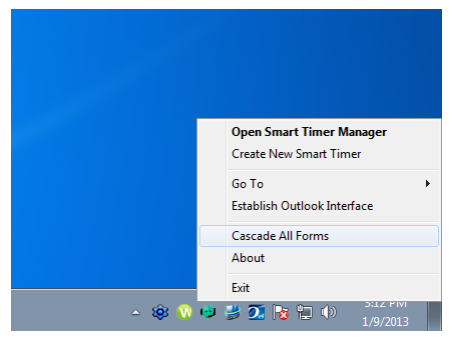
After you select this, all your windows will show in a logical order centered to your desktop. You can then reposition them manually.
http://orionlaw.com/lib/fn/Improve_Productivity_with_Dual_Screens.pdf