

Welcome to Orion Happenings, the second edition of 2013. For those of you who are unfamiliar with Happenings, think of it as a Newsletter for Orion Clients only. We want to provide our users with useful information, informative webinars, tips and tricks to help you become as productive as possible. Your feedback is valued, and we want to hear what Orion users have to say, please reach out to us at info@orionlaw.com.
iOrion® Webinar Series
We’ve made the announcement, and iOrion® is now ready to be launched at your firm! Join us for an informative webinar on the iOrion® Mobile Application for iOS (Apple iPad®, iPad® mini, and iPhone® compatible). Let us show you how this groundbreaking technology will benefit your firm by better managing timekeeping, clients and matters, and much more.
Tuesday, March 26th 3:00-3:30 PM EDT Register.
Thursday, April 18th 12:00-12:30 PM EDT Register.
Thursday, May 23rd 12:00-12:30 PM EDT Register.
Register for these webinars now as they will fill up quickly.
New Orion/4L Webinar Series
Orion, in association with 4L Law Firm Services LLC, is pleased to announce the formal inauguration of the Orion/4L Webinar Series. These monthly webinars will cover a variety of law firm business topics and are intended to share insights, stimulate ideas and generate discussion of the real-world challenges faced daily by law firm managers.
The webinars will be held at 2:00 PM EST on the last Thursday of each month (with a couple exceptions for holidays). The webinars will be conducted via Go-To-Webinar and registration information will be posted on both the Orion and 4L websites.
Here is a listing of the first six webinars:
How Financial Reporting is like Baseball – March 28th Register.
Trust Accounting Best Practices – April 25th
The Monthly Accounting Close Process – May 30th
Monthly Production Reporting – June 27th
Monthly Financial Reporting – July 25th
Key Performance Indicators – August 29th
This first webinar of this series will be held Thursday, March 28th at 2PM EST. Click here to register for “How Financial Reporting is like Baseball”. This webinar will be hosted by Mike Marget.
Mike Marget is the Senior Managing Director of 4L Law Firm Services LLC, an affiliate of Orion Law Management Systems, Inc. 4L performs outsourced bookkeeping and billing services and provides a managed IT solution for small and midsize law firms. These services utilize Orion’s financial management and practice management software, which 4L offers on a SaaS basis via the Cloud. 4L’s clients also include law firms who have installed Orion software and later decided to delegated some billing and other back office accounting tasks to 4L. Mike is a former large law firm administrator – COO and CFO – and can be reached at mmarget@4L-Law.com. He also edits a blog at www.LawFirmCFO.com.
Gearing up for ABA TECHSHOW
Orion made an exciting announcement launching the iOrion® Mobile Application at LegalTech NY. The feedback received was tremendous, as everyone wanted to hear about this new product launch. And now, Orion has even more exciting news that will be revealed in April at ABA TECHSHOW. From Orion v4.5, the new Expense Reimbursement Module and Orion’s integration with PayPros® Legal, you can see this is an exciting time for Orion users and we look forward to revealing more information on these upcoming product launches! Stay tuned for more details.
Make sure to visit the Orion booth #604 at ABA TECHSHOW in the Hilton Chicago. Fill out this postcard and bring it with you to our booth, and you’re entered to win an Apple iPad® mini!
Orion Announces New PayPros® Integration Module Enabling Law Firms to Accept Secure Credit Card Payments
New integration allows Orion customers to accelerate collections and improve cash flow
Orion & PayPros Integration
Orion Law Management Systems, Inc., a leader in financial and practice management software for professional services firms, announces a new integration with its AR Collection Module and PayPros® Legal, which allows Orion customers to accept credit card payments from clients.
Recent studies have shown that by accepting credit/debit cards, firms are able to greatly reduce collection time and collection costs versus traditional mailed checks payment. According to the PayPros® Legal Solutions survey, 74% of law firms reported improved cash-flow increases resulting from accepting credit cards and credit card payment led to an $831 additional billing per month, or $10,000 per year.
By allowing clients to pay by credit cards, the Orion/PayPros® interface will improve cash flow and reduce accounts receivable as well as enhancing payment security. Professional services firms will be able to streamline their financial management and accommodate or attract clients that prefer to pay by credit card.
Highlights of the Orion/PayPros® Integration Include:
- Ease of Use
- Authorization is received in seconds and the money is deposited in your bank account within 24 hours
- Increased Cash Flow and Reduced Accounts Receivable
- Eliminates hassle of bounced checks and associated bank fees
- Enhanced Payment Security
- MagTek® IPAD® is used to securely encrypt credit/debit card data from the very moment the card is swiped. Cardholder data is never stored locally at the firm, either on paper or electronically in Orion.
- Transactions are secure and Payment Card Industry (PCI) compliant
To read the complete Press Release, click here. Also, check out our brochure with more information.
Law Sites Blog: iOrion Brings Mobile Practice Management to Midsized Firms
By Robert J. Ambrogi
February 13, 2013
When it comes to law practice management technology, recent years have seen the launch of a bevy of cloud-based platforms. Clio was the first of these, followed by a number of products that include Rocket Matter, MyCase, LexisNexis Firm Manager, and the most recent addition to the lot, Thomson Reuters Firm Central. Cloud platforms offer many advantages, not the least of which is mobility – the ability to access your case and client information from any device.
But cloud platforms are not necessarily right for every lawyer or every firm. Orion has been a long-time provider of installed financial management, firm management and practice management systems for mid-sized law firms. Just last year, Sean Doherty looked at Orion and other installed practice management platforms for Law Technology News. He found that they offered good reasons for firms to stick with locally installed systems, most notably their deep integration with a firm’s back-office infrastructure and front-office tools.
Although most locally installed systems offer some form of mobile access, it is rarely on par with the full-featured mobile access some cloud systems provide. Aiming to remedy that with a full-featured mobile app, Orion introduced iOrion at the recent LegalTech show in New York.
Designed for the iPad, iPad Mini and iPhone, iOrion enables mobile access to key Orion financial management tools as well as to information about clients, cases and contacts. iOrion fully synchronizes with the desktop Orion, including the ability to start a timer in one and then manage it in the other.
Included within iOrion are:
Full access to all contacts. If you initiate a phone call or email from within iOrion, it automatically prompts you to make a time entry.
Access to key information about matters (or cases), including the ability to initiate and bill for time.
Customizable “Smart Timers” that make it easy to track time for multiple matters while away from your desktop.
Access to key client and matter financial information, including receivables, work-in-progress billing, accounts receiveable ledgers, retainer ledgers and trust ledgers.
As of this writing, iOrion is not yet available in the Apple iTunes Store. Orion is awaiting Apple’s final approval. I was provided with a pre-release version linked to a demonstration database containing mock client, matter and financial information.
Although I have never used the Orion desktop version, I found the app to be extremely easy to use and understand. I was particularly impressed by the depth of the financial data accessible through the app and by the capabilities it offers to track billable time and expenses.
I was also impressed by the ease of timekeeping on the app. To enter time manually, simply select the client or matter, select the activity code, and select the time, and you are done. If you wish to add notes to a time entry, you can. Alternatively, Smart Timers make it easy to simply turn on a timer for any client or matter and then automatically bill it when you are done.
In the range of features and access to data it offers, iOrion surpasses other mobile practice-management apps I’ve tried. Of course, iOrion can be used only by lawyers at firms where Orion is installed. For more information about the app, read Orion’s brochure.
New Client Welcome
Orion is pleased to announce that we have expanded our client coverage with the addition of Grais & Ellsworth LLP.
Grais & Ellsworth LLP is a litigation boutique located in New York City. The firm was founded in early 2007 and focuses on structured finance litigation, including litigation relating to mortgage-backed securities and CDOs of asset-backed securities, trust preferred securities, and other collateral. The firm is prosecuting many of the largest and most important cases in structured finance litigation. For more information on Grais & Ellsworth LLP, please visit their website at www.graisellsworth.com.
Robert H. Shah, Director of Finance at Grais & Ellsworth LLP:
“We were looking for a time and billing software which placed a strong emphasis on financial reporting along with a user-friendly interface. Orion has an impressive user-friendly design and is fully integrated with other software such as e-mail, word processing and spreadsheets. We chose to switch to Orion because it offers flexible financial reporting along with other valuable features not found in our previous time & billing software.”
Support Corner
Financial Management
What is the difference between the bill status of individual transactions and the bill status of a matter?
Have you ever been in the situation where you have a matter for which you can’t get an invoice to print, even though all fee and expense transactions are selected for billing? We’ve got step-by-step instructions on how to resolve this issue.
To read more about the difference between individual transactions and the bill status of a matter, check out the full article here.
http://orionlaw.com/lib/fn/Support_Center_FM_FAQ_March_2013
Practice Management
How to Customize Queries and Defined Views
Background
Orion is a robust Contact Relational Manager. It provides many features to assist you in viewing and gathering the right information anytime you need it.
We receive many support questions that revolve around a similar theme, “How do you extract data?” Depending on the specifics of the request, there can be different answers to this question. The most popular is using the custom Query bar.
In the below example we will take you through a basic query that allows you to locate all clients in a specific state. Keep in mind the Query bar can handle much more complicated actions that allow for more intensive data mining.
Instructions
The Query barislocated at the top of the screen (circled below) and contains saved queries.
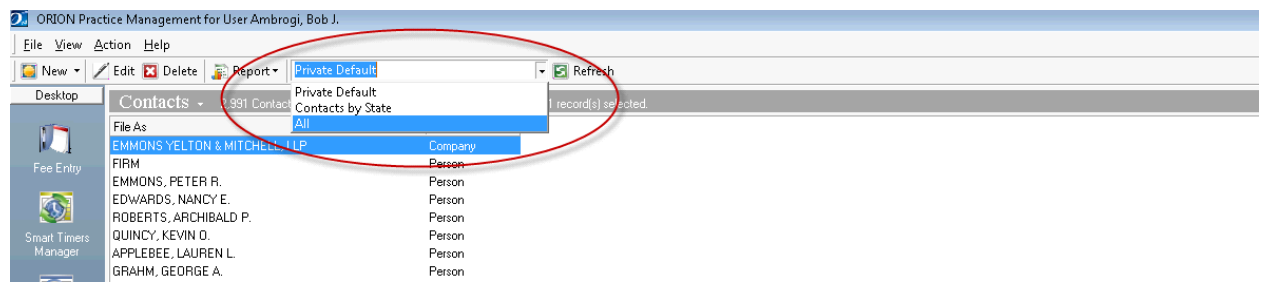
This list is populated with Queries that are saved in the system. Queriesmay either be saved privately or publically across all users. To access a list of your Queries, go to the View menu, and choose Define View. From the screen below, you can either create or modify queries. You may also choose a default.

Again, in this example, we want to create a query that will allow us to identify all clients within a specific state. We are going to press the NEW button and be presented with the following display box.

The name field allows us to give the Query a name. From this screen we can mark it as Public (available to other users). You can also decide if you want to use the current screen format or the default. You can customize the main columns in the main contact view, and have that view applied only to specific queries. In the lower panel you can add items which are commands as well as group them together to provide complex logic scenarios.
In this example, we will give it a name and add two bits of criteria,
• Info Type must be a client
• State must equal something February, 2013
Note: Since I want to run this query multiple times for different states, I’m not going to specify a state in the query. Instead I will check the box next to “Runtimes”which will prompt the user to insertthe state that they are requesting.
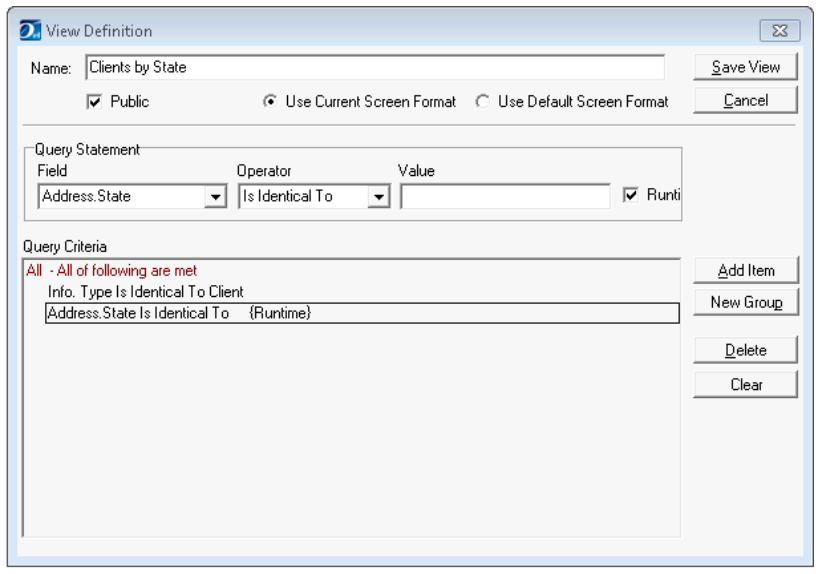
If we save the view and go back to the main contacts window, we can choose this query from the Query bar. You can now filter the data to match any state you wish.
With the data properly filtered, you can now use any of the reports or exporting options available to you (REPORTING button). For example, you might want to export it to Excel for a mailing list or Word for a mail merge.
Orion has hundreds of customizable fields that can be mined upon. Along with having dozens of operators that help you fine tune the search into the specific formula that you need. Orion also includes any custom fields that your firm may have in custom tabs.
http://orionlaw.com/lib/fn/Support_Center_FAQ_PM_February_2013
Tech Tip
Pervasive PSQL Repair Feature FAQ’s
Pervasive introduced a new anti-piracy feature in version 11 that can invalidate the Pervasive license. Periodically, Pervasive will check itself through the internet and compare the current hardware to that of what was originally installed. If enough changes are detected, it will assume it has been pirated, and invalidate the key. This can cause a firm major frustration as it prevents Orion from working properly. Pervasive PSQL v11 SP3 introduced the license repair feature which allows firms to repair the key directly.
To read the complete list of FAQ’s to help you understand the Pervasive PSQL Repair Feature, click here.
http://orionlaw.com/lib/fn/Tech_Tip_March_2013
Reader Feedback
Orion wants to hear from YOU!
We’ve been thinking about how we could make our monthly newsletters even better, and how we can use it to help you become more efficient and more profitable. Do you want to see more articles, industry news, technical tips, or case studies? We are open to suggestions of what content our readers find most beneficial. Share your ideas with us and we’ll make sure to include them in a future edition!
We also invite you to “Be Your Own Case Study”! Let our readers know how Orion has benefited your firm. Contact us if you would like to share with others how Orion, or a feature of Orion, has impacted you.