

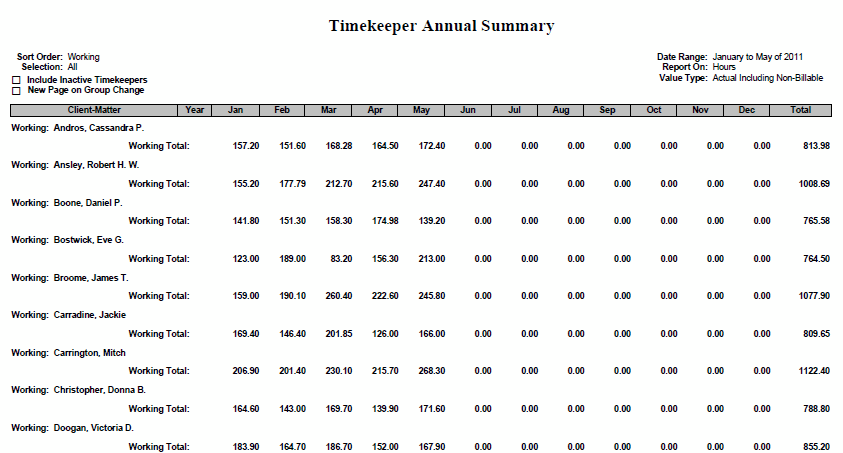
The Timekeeper Annual Summary (located under Staff Productivity Reports) reports activity on a month by month basis for hours/dollars entered, hours/dollars billed or fees collected by Timekeeper. You can choose to include the Previous Year values or choose to compare to Budget (must be using Timekeeper Budget feature). You may run the report based on hours or dollars (dollars only for collected values). Various sort orders and options are available. Fees Collected is the sum of PMT, RAP and TAP transactions. This report does not include unreleased or incomplete time.
SORT ORDERS
Working Attorney
Responsible Attorney
Managing Attorney
Originating Attorney
Project Attorney
Type of Law
Department
Location
Timekeeper Level
OPTIONS
One or All of Sort Order Type
Current Year Only, Include Previous Year or Include Budget
First And Last Month and Year
Report Hours or Dollars
Value Type
Actual Including Non-Billable
Actual Excluding Non-Billable
Billable Value
Billed – Based on Invoice Date
Non-Billable Only
Collected Value
Billed – Based on Work Date
Detail Level
None
Timekeeper
Working, Client
Working, Client-Matter
Include Inactive Timekeepers
Page Break on Group Change
Various Summary Options
Various Filter Options
Client-Matter
Working Attorney
Responsible Attorney
Managing Attorney
Type of Law
Department
Location
Timekeeper Level
BALANCING WITH OTHER REPORTS
The Timekeeper Annual Summary, when run for the same date range and including inactive Timekeepers, can be balanced to various reports depending on the Value Type chosen when the report is run.
Value Type = Actual Including Non-Billable will balance to:
Fee Listing – Total Hours and Total Dollars
Timekeeper History – Hours Entered and Value Entered
Summary of Hours Worked – Total Hours and Total Amount
Daily Time Summary – Total Hours
Timekeeper Productivity – Total Hours Reported
Client-Matter Annual Summary – Total Hours/Total Dollars
Value Type = Actual Excluding Non-Billable will balance to:
Timekeeper History – Hours Entered and Value Entered
Summary of Hours Worked – Total Billable Hours and Total Billable Amount
Daily Time Summary – Total Hours
Timekeeper Productivity – Billable Time Value and Billable Hours Reported
Client-Matter Annual Summary – Total Hours/Dollars
Value Type = Billable Value will balance to:
Cient-Matter Annual Summary – Total Hours/Dollars
Value Type = Billed – Based on Invoice Date Value will balance to:
Client-Matter Annual Summary – Total Hours/Dollars
Timekeeper History – Hours Billed and Value Billed
Timekeeper Productivity – Hours Billed and Fees Billed
Billing Realization – Billed Hours and Billed Amount
Net Realization (Fees Only) – Billed Amount
Billing Realization by Working Attorney – All fields
Value Type = Non-Billable Only will balance to:
Summary of Hours Worked – Non-Bill Hours
Daily Time Summary – Total Hours
Timekeeper Productivity – Non-Billable Time Value and Non-Billable Hours Reported
Client-Matter Annual Summary – Total Hours and Total Dollars
Value Type = Collected will balance to:
Client-Matter Annual Summary – Total Dollars
Value Type = Billed – Based on Work Date will balance to:
Client-Matter Annual Summary – Total Hours and Total Dollars
Summary of Hours Worked – Billed Hours and Billed Amount